Affinity Scheduler
The Affinity scheduler is the scheduler provided and developed by CanvasMC. It is recommended that when using Canvas, you use and configure this scheduler. This scheduler is one of the core optimizations Canvas provides, known to significantly improve region MSPT/TPS in production servers.
To set your scheduler to this scheduler, change the threaded-regions.scheduler option in paper-global.yml to AFFINITY
This scheduler is based off the EDF scheduler type, modified and optimized to be as performant and configurable as possible.
By default, this scheduler has all extra features disabled, making it act closer towards the EDF scheduler. While this can
be fine by default, to gain optimal performance it is recommended that you enable the configurations provided by Canvas for this
scheduler type.
Configuring
Section titled “Configuring”The Affinity scheduler needs a bit of prior setup for optimal performance. At the head of the Canvas configuration file, you will see something similar to this section:
"scheduler": { "runTasksBufferMillis": 0.1, "stealThresholdMillis": 3, "tickRegionAffinity": [], "enableAffinitySchedulerCpuAffinity": false, "enableWorkStealing": false, "enableMidTickTasks": false}The main configurations are:
- enableMidTickTasks - This enables tasks for regions to be processed while waiting for the region tick start time, rather than parking the entire time if it does have tasks. If it has no tasks, it parks like normal. If it finishes all the tasks it has before the deadline, it parks for the rest of the time.
- enableWorkStealing - This enables work stealing for the scheduler. This allows the scheduler to try and optimize region tick time by trying to keep regions on the same tick runner consistently unless it starts missing its tick deadline. This helps to keep the task load balanced and efficient. Once the region misses its deadline by the configured threshold, it can be stolen by other tick runners.
- runTasksBufferMillis - The amount of time in milliseconds that will act as a buffer before running the tick. If this is set to
1, it will end running mid-tick tasks 1ms before running the tick to ensure it executes on time. By default, it’s0.1D- Note: this requires
enableMidTickTasksto be enabled
- Note: this requires
- stealThresholdMillis - The amount of time in milliseconds that a task must be late before being “stealable”. By default, this is
3, which means that a task must be late to its deadline by 3ms until another thread can steal it.- Note: this requires
enableWorkStealingto be enabled
- Note: this requires
When trying to optimize your setup with the Affinity scheduler, it is recommended to at least enable mid tick tasks and work stealing for a good performance boost, and if you fit the requirements, then enable and configure affinity too.
Affinity Lifecycle
Section titled “Affinity Lifecycle”The Affinity scheduler supports intermediate task execution, which means it processes tasks outside of the actual task tick, reducing the tasks runtime MSPT, and improving latency. This is an important part of the core lifecycle of the scheduler. The scheduler lifecycle is as such:
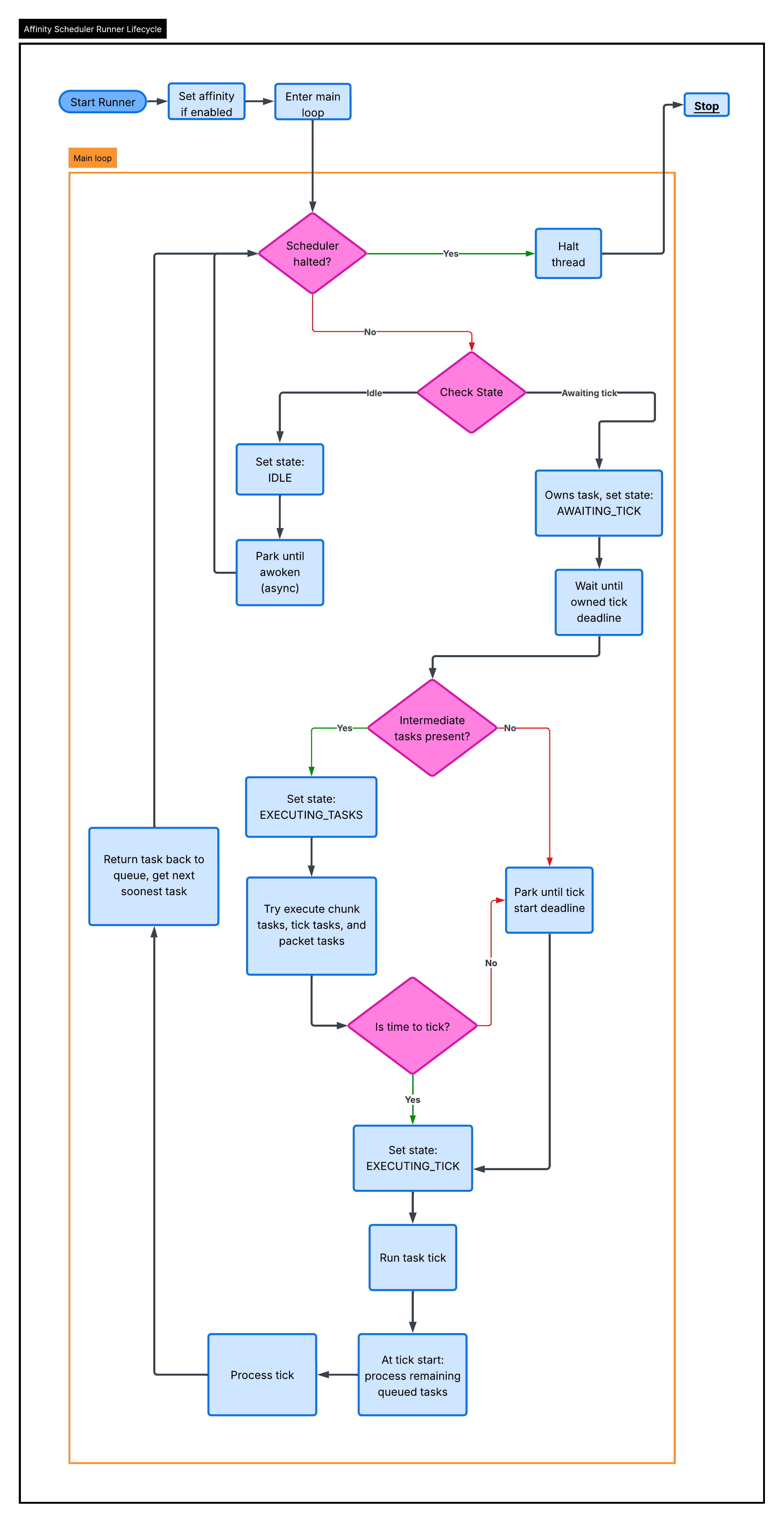
When a task is picked up by a thread, it tries to run tasks. Those tasks are run until a boolean(true or false) supplier tells them to stop:
BooleanSupplier canContinue = () -> !scheduler.halted && ((deadline - scheduler.runTaskBuff) - System.nanoTime() > 0L);Once this returns false, the following events must have occurred:
- The scheduler was told to stop. Most likely, the server is starting shutdown
- We hit the buffered deadline
The deadline for task processing is determined by subtracting the task deadline by the runTasksBufferMillis config(converted to nanoseconds).
This option is meant to ensure that task ticking doesn’t overflow into the tick deadline, ensuring tick times are met as close as possible.
Once it is done processing tasks, the beginning of the region tick will drain the remainder. Once it is done draining, it will process the rest of the region tick and then return the task to the scheduler queue(determined by the work stealing config). The thread will then immediately search for a new task to take. If work stealing is disabled, it will return the task with the earliest deadline in the full queue.
If work stealing is enabled, each thread has their own isolated queue for their own tasks. The polling system, works like this:
- Peek at the local queue head and global queue head. For ref, the “head” of the queue will always be the task that has the soonest deadline
- If the local head and global head are both overdue, we compare to find which is sooner, and take that task.
- If the local head is overdue, and the global head isn’t, we take that task.
- If the global head is overdue, and the local head isn’t, we take that task.
- If we have reached this point, both the local and global heads are not overdue.
- We then compare the local and global heads, to find the soonest candidate. If one of them isn’t present, then the other head is declared the soonest.
- Now, we try our steal logic. The steal logic is determined by a
round-robinselection styleround-robinselection is a method of selecting elements from a group equally and rationally through a rotating order, top to bottom, and repeating. It ensures fair and turn-based distribution, reducing favoritism- We do this method of selection because iterating over every single thread in such a time-sensitive area is not ideal in the slightest.
- We check the next steal candidate queue head, and if it is stealable, we take that task.
- We take the task here because if we got to this point, neither the local or global heads are overdue, and the stealable head is past its deadline
- Then, if we have a “best candidate”, we take that task. The only case where we won’t have a “best candidate” is where there are no tasks in the global or local queue anymore.
New tasks, unlike the work stealing scheduler, are picked up by whichever thread is available to take the task next.
All operations involving the queue of the scheduler, like insertion, polling, etc, run through a lock called the scheduleLock.
This lock ensures all operations are atomic and safe, and avoids race conditions and such.
The tasks are compared via a comparator of their tick times, always choosing the task with the sooner deadline. The tie
breaker is defined by Long.signum(task1.id - task2.id). The ids are unique per task
Affinity Scheduling
Section titled “Affinity Scheduling”The Affinity scheduler supports CPU affinity, disabled by default, this makes it so each tick runner is tied to a dedicated thread on the CPU, and ensures that the JVM only schedules that tick runner to that physical thread on the CPU.
When configuring affinity for the scheduler, you need to enable the enableAffinitySchedulerCpuAffinity option. If your tickRegionAffinity
set is empty(default), Canvas will log your CPU topology. Here is an example output with an i9-14900HX:
CPU Model: Intel(R) Core(TM) i9-14900HX====================================CPU CORE SOCKET L1d:L1i:L2:L30 0 0 0:0:0:01 0 0 0:0:0:02 4 0 4:4:1:03 4 0 4:4:1:04 8 0 8:8:2:05 8 0 8:8:2:06 12 0 12:12:3:07 12 0 12:12:3:08 16 0 16:16:4:09 16 0 16:16:4:010 20 0 20:20:5:011 20 0 20:20:5:012 24 0 24:24:6:013 24 0 24:24:6:014 28 0 28:28:7:015 28 0 28:28:7:016 32 0 32:32:8:017 33 0 33:33:8:018 34 0 34:34:8:019 35 0 35:35:8:020 36 0 36:36:9:021 37 0 37:37:9:022 38 0 38:38:9:023 39 0 39:39:9:024 40 0 40:40:10:025 41 0 41:41:10:026 42 0 42:42:10:027 43 0 43:43:10:028 44 0 44:44:11:029 45 0 45:45:11:030 46 0 46:46:11:031 47 0 47:47:11:0What this data means
Section titled “What this data means”CPU - This is the logical processor id seen in the OS. This is the number you should put in the affinity array config.
On the CPU in the example, CPUs 0-31 represent 32 logical processors. This is the id the OS uses for scheduling threads, and
it’s what the net.openhft:affinity library uses when setting the per-runner affinity internally.
CORE - This is the physical core id on the CPU. If you look at the example provided, notice how CPUs 0 and 1 both map
to core 0, and CPUs 2 and 3 map to core 4. When two logical CPUs share the same core number, they are hyperthreads.
The example provided, using the i9-14900HX, CPUs 0-15 are P-cores(performance cores), each with two hyperthreads, while
CPUs 16-31 are the E-cores(efficiency cores), each mapping to a unique core, with no hyperthreading. You can tell because
P-core pairs share a core id(e.g. CPU 0 and 1 -> core 0), while each E-core CPU has its own distinct core id
(e.g. CPU 16 -> core 32, CPU 17 -> core 33).
SOCKET - The physical CPU socket the processor belongs to. On a normal consumer chip like the i9-14900HX, this is
always 0, since there is only one socket. On server hardware with multiple physical CPUs(dual socket Xeon boards for example),
you would see 0 and 1 there. Keeping tick runners on the same socket avoids cross-memory latency, though the scheduler
doesn’t support NUMA-aware scheduling, so this is more of an informational notice than anything.
L1d:L1i:L2:L3 - These are the cache ids for each cache level: L1 data, L1 instruction, L2, and L3. When two CPUs share the
same cache id at any given level, they physically share that cache. This is useful for understanding the relationships between cores.
In the example, CPUs 0 and 1 share all cache levels(0:0:0:0), confirming they are hyperthreads on the same core.
CPUs 0 and 2 share the same L3(both show :0 at the end), but don’t have the same L1 and L2 caches, meaning they’re on
separate cores within the same cache cluster.
How to Use This Data
Section titled “How to Use This Data”The tickRegionAffinity option is an array of CPU ids, taken as strings. You must include 1 value for every thread allocated to
threaded regions(defined in paper-global.yml:threaded-regions.threads), meaning if you allocate 10 threads, you need to have 10
values in this array. The scheduler will assign one CPU per tick runner.
It is heavily recommended to prefer P-cores over E-cores for tick runners. P-cores(CPUs 0-15 in the example) have higher single-threaded performance, which benefits region tick time. E-cores are better left for the OS, JVM, and other systems in the server(like the chunk system, plugins, netty, etc). If you have 4 tick threads, pick 4 P-core CPUs rather than E-cores.
Also try and avoid scheduling two tick runners on the same physical core. Two hyperthreads on the same core(e.g. CPUs 0 and 1)
compete for execution resources like ALUs(Arithmetic Logical Units). If you assign like 4 tick runners, pick one CPU from each
P-core pair. For example, ["0", "2", "4", "6"], rather than ["0", "1", "2", "3"]. This gives each tick runner its own full
physical core with no contention.
Putting it all together, assume you’ve allocated 4 runners on an i9-14900HX(like in the example). A strong configuration would be:
"tickRegionAffinity": ["0", "2", "4", "6"]This selects one hyperthread from each of the first four P-cores. Each runner gets a dedicated physical core with its own L1 and L2 cache,
all sharing the same L3. CPUs 1, 3, 5, 7(the sibling hyperthreads) and all other cores remain free for everything else.
The key part of this feature of the scheduler is that once you configure these CPU ids, each runner is constructed with its assigned id, and on startup it pins immediately to hard-pin the thread. After that point, the OS will not migrate that thread to another core, eliminating context-switch overhead and keeping caches warm, which complements work stealing perfectly.