Intro to Plugin Dev
Developing a Horizon plugin is mostly simple. One tool you can use is the Gradle plugin, which is described in more detail below. To start with developing a Horizon plugin, you need a plugin metadata file. Instead of adding onto the existing plugin YML file, Horizon introduces its own metadata type. You cannot combine the two plugin types. Horizon plugins work fundamentally differently from Paper plugins.
Horizon plugins cannot interact with Paper plugins due to how the classloader works (described below). However, Paper plugins can interact with Horizon plugins. As such, Horizon requires that, if you are going to attempt to interact with other Paper plugins, you need to setup a split source set. Otherwise, just use a normal setup, which means it is strictly only a Horizon plugin, and cannot interact with other Paper plugins in the server, only other Horizon plugins and server internals, and the Horizon API.
The Horizon metadata file is horizon.plugin.json. The metadata file follows a similar structure to plugin metadata
files, but not completely. Here is an example:
{ "name": "TestPlugin", "version": "1.0.0-SNAPSHOT", "description": "Hello world", // All entrypoints for the server "entrypoints": [ { "server_main": "io.canvasmc.testplugin.ServerMain" } ], /* All class transformers provided by the plugin for the server, documented in the Class Transformers API section */ "transformers": [ "io.canvasmc.testplugin.TransformerTest" ], // The authors of the plugin "authors": [ "CanvasMC" ], "load_datapack_entry": false, "mixins": [ "mixins.test.json" ], "wideners": [ "widener.at" ], // This is your dependencies block for Horizon TODO - make this system "dependencies": { /* The "minecraft" value is optional. It's a version constraint that must be above 1.20.6 by requirement, as it is the minimum Horizon supports. This is checked against the Minecraft version being booted */ "minecraft": ">=1.21.1", /* The "java" value is also optional, and functions the same as the "minecraft" value. It is guaranteed that the server is running the minimum required Java version or newer for that Minecraft version by the time this is validated. */ "java": "25", // Literally same thing as the other 2, but for ASM "asm": "9.0" }}mixins- This is aString[]option that defines the SpongePowered mixin configuration files in your plugin artifact. Like if it weretest.mixins.json, the entry should be in the root of your resources, namedtest.mixins.jsonwideners- This is the same as themixinsfield, but defines Forge access transformers for your plugin. The team initially wanted to use Fabric wideners, but to keep consistency with Paper’s build system and paperweight, we decided it would be best to use transformers instead. You can find detailed documentation regarding Forge access transformers hereload-datapack-entry- This is just abooleanoption,falseby default, that defines if your plugin should be loaded as a datapack entry too, similar to how the Fabric loader loads mods as datapacks too. While somewhat useless in more modern versions of the game due to Papers lifecycle API, this introduces a more direct way to load your plugin as a datapack, and also supports the/minecraft:reloadcommand to reload your plugin datapack assets
To check if your plugin is loaded as a Horizon plugin successfully, you can read the plugin data tree in the startup logs, which will look similar to this:
[12:32:43] [INFO]: Found 2 plugin(s): - TestPlugin 1.0.0-SNAPSHOT - Horizon 1.0.0-beta.localAnother way is by checking the /plugins command, which is replaced with the Horizon internal mixins to include Horizon
plugins.
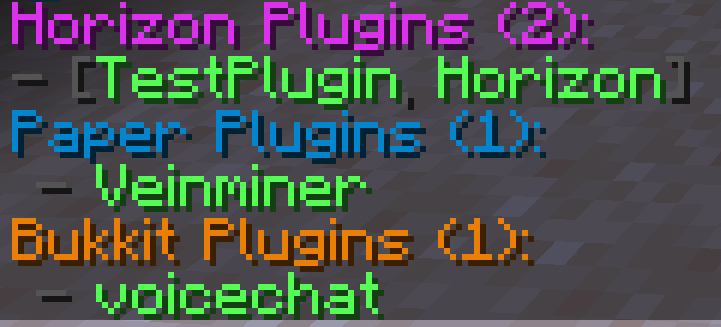
You can learn about how to use our Gradle plugin to assist in Horizon plugin development below, along with JIJ. It is also recommended to familiarize yourself with the new classloader hierarchy in the New Classloading Tree section
JIJ(JAR In JAR)
Section titled “JIJ(JAR In JAR)”Another capability Horizon plugins have is JIJ(JAR In JAR). JIJ is a feature that allows Horizon plugins to attach
Horizon plugins, Paper plugins, or external libraries.
All JIJ plugins will be loaded from the horizon.yml:cacheLocation configured location, which is fetchable via Horizons
API, which is documented here.
All Paper plugins will be loaded as usual, and their plugin data folders will remain in the same place. Horizon plugins
will function exactly the same, and will load
mixins like normal. External libraries will be appended to the game classpath with Ember, as if they were libraries
added by the server JAR, and will be accessible after Horizon launches the game.
Gradle Plugin
Section titled “Gradle Plugin”In order to start developing plugins for Horizon, it is required that you use the horizon Gradle plugin in your build
scripts together with the weaver-userdev plugin. The horizon plugin automatically applies your ATs to the server
JAR your plugin is going to be developed against, allowing you to compile against it and access the server’s internals,
and the userdev plugin allows it to achieve all that.
Below is shown an example build.gradle.kts configuration structure, that compiles, to give you an idea of how to start
developing!
Keep in mind that the versions provided below might be outdated, and you should always search for and ensure you’re specifying the latest versions available.
For a list of all available configurations for the horizon plugin along with JDs, please refer to here
plugins {    id("io.canvasmc.weaver.userdev") version "2.3.12"    id("xyz.jpenilla.run-paper") version "3.0.2"    id("io.canvasmc.horizon") version "1.0.0"}
dependencies {    horizon.horizonApi("1.0.0-build.1") // <- required for accessing the Horizon API, and also provides MIXIN deps.    paperweight.paperDevBundle("1.21.11-R0.1-SNAPSHOT")}
horizon {    accessTransformerFiles.from(        file("src/main/resources/wideners.at"),        file("src/main/resources/additional_wideners.at"),    )}
The run-paper plugin is automatically configured to download a jar for the version specified in the dev bundle;
however, it can be overridden, by manually specifying a version;
Refer to its github page for more information.
In addition, using the shadow Gradle plugin is unsupported and you should instead opt-in to JiJ’ing your
dependencies by using the appropriate configurations, just like this:
dependencies { includeMixinPlugin("io.canvasmc:nice-horizon-plugin:1.0.0") includePlugin("io.canvasmc:nice-plugin:1.0.0") includeLibrary("io.canvasmc:nice-library:1.0.0")}The above configurations define in what directory the dependency is going to be placed in the JAR file structure, and their names are pretty intuitive in themselves; however, each one is described in detail below anyway.
For a Horizon-based plugin dependency, the appropriate configuration is includeMixinPlugin, which puts it under
META-INF/jars/horizon.
For a normal plugin dependency, aka not-horizon, you should use the includePlugin configuration, which places it under
META-INF/jars/plugin.
Finally, for a library, the configuration to use is includeLibrary, which places it in META-INF/jars/libs.
All of those dependencies will be loaded at the server startup. For a more detailed overlook refer to the JIJ section.
To develop hybrid plugins using the horizon Gradle plugin, you need to configure it appropriately, like this:
horizon { splitPluginSourceSets()}This configuration registers another source set by the name of plugin that has access to the main source set and all of its dependencies.
It also works with Kotlin and other JVM-based languages.
Below is the internal graph of how the source sets interact with eachother to help you understand the constraints of their interactions.
dependencies (general)│main source set│└── plugin source set └── dependencies (exclusive to this source set)The source set’s classes will be automatically packaged as a JAR file by the pluginJar task, which will append a plugin classifier to the produced JAR file,
and also package it into the artifact produced by the main jar task as a JiJ dependency.